
Fofi - Fun AI Pet Effects
Sparking Innovations LimitedVideo Players & Editors
3.973.00 Reviews
- Version
- 1.8.0
- Installs
- 100.00K
- Age Rating
- Everyone
Screenshots
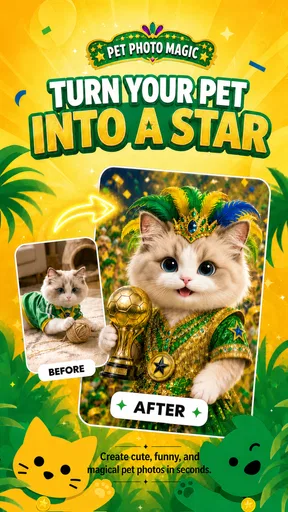

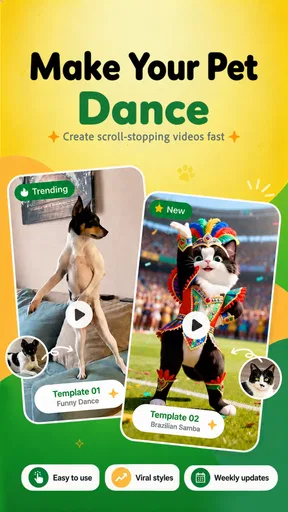
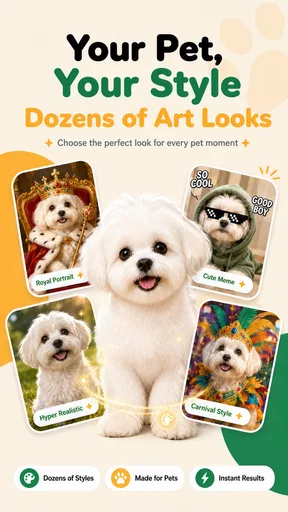
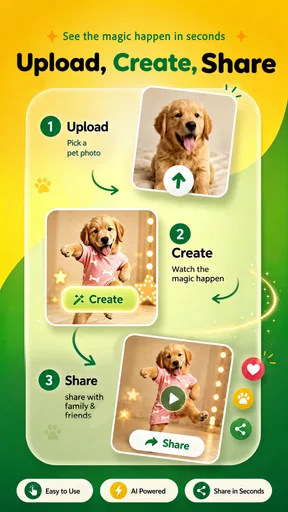
Our Review of Fofi - Fun AI Pet Effects
 Analysis by Appyee
I approached Fofi - Fun AI Pet Effects as a small creative tool rather than a full video editor. Its appeal is easy to understand: take a pet photo or clip, add a playful effect, and turn an ordinary moment into something worth sending to friends. In my testing mindset, the important question is not whether it can replace a professional editor, but whether it makes a quick pet post easier and more entertaining.
That focus gives the app a clear identity. It belongs to the video players and editors category, yet it feels aimed at casual creators who want a result quickly instead of a long timeline full of controls. The developer is Sparking Innovations Limited, and the app is free to install for Everyone. Optional in-app purchases range from $0.99 to $6.99 per item, so I would treat the free experience as the starting point and check the purchase screen carefully before committing to any extra effects.
Starting with an ordinary pet moment
The best starting material is not necessarily a carefully staged portrait. A relaxed dog on the sofa, a cat looking toward the camera, or a short clip of a pet walking through the room can become more amusing when the effect matches the animal’s expression. I found that this kind of app works best when I begin with a clear subject and a simple idea, rather than expecting the effect itself to rescue a poorly framed image.
The store summary presents the central concept as making cute pet videos and photos with dancing, costumes, and similar playful treatments. That makes the creative entry point unusually approachable. I do not need to plan a complete story before opening the editor. I can start with a single image, choose a direction, and decide whether the result feels funny, sweet, or simply strange enough to share.
There is also a useful distinction between a private keepsake and a public post. For a family group chat, an exaggerated costume or dance treatment can be enough. For a public social account, I would spend more time choosing a source image with a clean background and a visible face. Effects built around a pet’s appearance are easier to appreciate when the original animal remains recognizable.
One practical tip is to prepare several candidate photos before editing. The first image that looks cute in the gallery may not produce the strongest result once an effect is applied. A front-facing photo, even lighting, and some space around the pet usually give a more flexible starting point than a tightly cropped image where ears, paws, or the tail are already cut off.
Choosing the right purpose before editing
I would use this app for three main jobs. The first is a quick reaction post: a pet does something amusing, and I want a visual response without opening a complex editor. The second is a themed greeting, such as giving a cat a costume-like appearance for a birthday message. The third is a short sequence of playful experiments that I can compare before deciding which one deserves to be shared.
It is less suitable when the goal is a polished campaign, a narrated tutorial, or a carefully timed montage. Traditional mobile editors are better when I need precise cuts, captions, music placement, transitions, or control over several clips. Fofi’s strength is the idea and the transformation, not detailed post-production.
For a realistic everyday example, imagine taking a photo of a sleepy dog after work. I would first try a gentle effect that keeps the dog’s face obvious, then compare it with a more exaggerated dance or costume treatment. If the playful version looks natural enough, I could send it to a family chat. If it distorts the face or hides the dog’s expression, the original photo may actually be the better choice.
Working through the making process
The creative process feels most successful when I treat each effect as a rough concept rather than a guaranteed final image. A cute idea can look different once applied to a particular pet. Fur patterns, side profiles, dark rooms, and busy backgrounds can all change how convincing or readable the result feels.
I recommend checking the entire preview before judging it. A thumbnail may look appealing because the costume or movement is obvious, while the full result reveals an awkward crop or a distracting background. Conversely, a first impression that seems slightly odd can become charming once the complete animation or composition is visible.
Another useful habit is to keep the source image simple. If my pet is surrounded by toys, blankets, and furniture, an effect may have more visual competition than it needs. A plain wall or uncluttered floor gives the transformed subject more attention. This is not a limitation unique to one tool, but it matters more in a fast-effect workflow because there are fewer opportunities to correct the composition afterward.
I also prefer making one change at a time. When I switch between the source image and multiple effects too quickly, it becomes difficult to tell whether the problem is the photo or the treatment. Testing the same image with a few clearly different styles gives me a better sense of what suits that pet. A calm cat may benefit from a subtle costume, while a dog caught mid-jump may support something more energetic.
Where the quick workflow helps
The biggest advantage is reduced decision fatigue. In a conventional editor, I may spend more time choosing a canvas, arranging layers, and searching for stickers than actually creating something. Here, the concept is narrower, so I can focus on the pet and the joke. That makes it a good companion app for spontaneous moments when I have only a minute or two.
The focused approach also helps people who are not comfortable with editing software. Someone who would never build a timeline can still understand the basic creative task: choose a pet image, try an effect, inspect the result, and decide whether to keep it. That simplicity is especially valuable for family sharing, where the goal is often conversation rather than technical perfection.
At the same time, simplicity can become friction when I want control. If an effect is nearly right but the crop, timing, or placement needs adjustment, I may run out of useful options quickly. I would not install this expecting detailed masking, color correction, audio mixing, or professional export controls. A dedicated editor remains the better tool for those jobs.
Using purchases with a clear plan
Because the app is free but includes optional purchases, I would explore the basic workflow before buying anything. The right question is not whether a premium-looking effect is attractive in isolation, but whether it fits the kind of pet content I actually make. A single effect that works repeatedly for my dog may be more valuable than several styles I use once.
I would also avoid making a purchase while still experimenting with source images. First find out whether the app suits your pet, your preferred visual tone, and your sharing habits. The listed purchase range starts at $0.99 and reaches $6.99 per item, so the cost can remain modest or become more noticeable depending on how many individual additions you choose.
Iteration: improving a result without overworking it
Iteration is where I see the difference between a disposable novelty and a useful creative tool. The first result is often a draft. I look at whether the pet is still recognizable, whether the effect supports the expression, and whether the image communicates its joke without an explanation.
My preferred comparison method is simple: keep the original beside the edited version and ask which one has the clearer focal point. If the effect covers the eyes or makes the body shape confusing, I would try another source image before blaming the style. If several images fail in the same way, that tells me the effect may not suit the kind of pet content I want to produce.
I also consider the intended viewing size. A detail that looks amusing on a phone may disappear when the image is seen as a small preview in a messaging app. Large costume elements and clear movement usually survive that reduction better than tiny decorative details. For social sharing, I would favor immediate readability over a complicated visual gag that requires zooming in.
One non-obvious workflow is to create a small set of variations from the same original rather than editing unrelated photos. This makes the comparison fair. I can see whether a dance treatment, costume treatment, or another playful direction best suits the same expression. It also helps me avoid choosing a favorite merely because one photo happened to be brighter or better framed.
There is a trade-off between surprise and control. The more automatic the transformation feels, the more spontaneous the result can be. That is part of the fun, but it also means I need to accept occasional odd outcomes. If my priority is a predictable brand style or a precise visual message, I would move the output into a more controllable editor afterward, assuming the resulting file fits that workflow.
Knowing when to stop
Pet content is easy to over-edit because the subject is already expressive. I usually stop once the effect adds one clear idea. Adding more treatments simply because they are available can make the final piece noisy and reduce the charm of the original moment.
This is also where the app may not be right for everyone. If you want realistic retouching, serious color work, or a clean professional finish, a conventional photo editor will give you more dependable control. If you want a meme, greeting, or playful reaction that can be made quickly, the narrower approach is more useful.
Export and handoff to the next destination
I think of the final stage as a handoff rather than the end of the creative process. Once I have a version I like, I want it to be easy to use in the place where the idea began: a private message, a social post, or a personal collection. Before sharing, I would watch or inspect the complete result once more, because a funny concept is not enough if the final framing feels unfinished.
The handoff decision depends on the audience. For a close friend, an unusual result can be part of the joke. For a wider audience, I would select the version that explains itself visually and keeps the pet’s identity clear. I would also add any caption or context in the destination app rather than forcing the creative tool to do more than it is designed for.
Fofi should not be confused with a full publishing platform. I see it as the place where the visual idea is generated, then another app handles the final caption, schedule, audience, or broader presentation. That division of labor is sensible: the pet effect stays focused, while the social network or messaging app manages delivery.
For creators who produce regularly, I would establish a small handoff routine. Save the strongest version, compare it with the original, choose the correct audience, and only then publish. This prevents the common mistake of sharing the first amusing draft before noticing a distracting crop or an effect that does not read well outside the editor.
Privacy-conscious users should make their own judgment before importing personal images, especially photos that include children, home interiors, or other people. I would choose images intentionally and avoid uploading anything I would not feel comfortable processing through a creative service. That is sensible practice for any image-effect application, not a reason to treat pet content casually.
Who will enjoy it, and who should skip it?
I would recommend this app to pet owners who want fast, lighthearted content and to casual creators who find traditional editors too involved. It is also a good fit for someone who enjoys experimenting with a familiar subject and does not mind that some results will be more successful than others.
It is a weaker choice for videographers who need a detailed timeline, creators who require repeatable professional branding, or anyone looking primarily for conventional trimming and correction tools. In those cases, a standard mobile video editor offers better control and a more dependable path from raw footage to finished delivery.
The public response suggests a reasonably established but not dominant audience: the app has an average rating of 3.9 from around 881 ratings, with over 100 thousand installs and 73 written reviews. I read that as a reason to try it personally rather than assuming it will suit every device, pet, or creative style. The rating is neither a warning nor a guarantee; the concept is specific enough that individual results will matter more than the number alone.
The current release is version 1.8.0, and the app was released on June 4, 2026. It requires Android 9 or newer, which is worth checking before installation on an older phone. Since it is free to start and rated for Everyone, the barrier to testing the basic idea is low, provided the device meets that requirement.
My creator verdict
After looking at the complete workflow, I see Fofi as a playful idea generator with a useful niche. It does not try to be an all-purpose production suite, and that is exactly why it can be enjoyable. I can begin with an ordinary pet moment, test a few visual directions, reject the awkward versions, and end with something that feels personal rather than assembled from a generic template.
The strongest reason to use it is speed with personality. The app gives casual pet content a creative push without asking me to learn a complicated editing system. Its best results come when I choose a clear source image, match the effect to the animal’s expression, and accept that a little unpredictability is part of the experience.
My main reservation is the limited control that comes with that speed. When an effect is close but not quite right, I may need to change the source image or accept the result instead of fine-tuning every detail. I would also approach the optional purchases selectively and use another editor for captions, audio, precise cuts, or professional delivery.
For a friend who wants to make a funny pet message tonight, I would suggest trying it. For someone building polished video content or managing a repeatable publishing workflow, I would suggest using it only as an idea-making step alongside a fuller editor. In that role, it is focused, approachable, and most convincing when the goal is not perfection but a quick creative moment that makes people smile.
Verdict
Strengths of Fofi - Fun AI Pet Effects
- Turns ordinary photos into playful pet-themed edits in seconds.
- Simple interface makes it easy for beginners to create effects.
- Offers entertaining results suitable for sharing on social media.
- AI processing reduces the need for manual editing skills.
- Fun choice for casual photo experiments and quick creative posts.
Limitations of Fofi - Fun AI Pet Effects
- Some effects may look inconsistent on different faces or pets.
- The most appealing features may require in-app purchases.
- AI-generated results can take longer on older devices.
- Privacy details should be checked before uploading personal photos.
- Results depend heavily on image quality and suitable lighting.
Similar Picks in This Category
View All
Google TV
Google LLC3.9

iTunes
Apple4.7

YouTube
Google LLC3.8

MX Player
Amazon Mobile LLC4.2

CapCut - Video Editor
Bytedance Pte. Ltd.3.5

PLAYit-All in One Video Player
PLAYIT TECHNOLOGY PTE. LTD.4.5
Frequently Asked Questions
What is Fofi - Fun AI Pet Effects?
Fofi - Fun AI Pet Effects is a mobile entertainment app that uses artificial intelligence-style effects to transform photos and videos with playful pet themes. It is designed for users who want to create amusing animal-inspired images, expressive edits, and shareable content without needing advanced photo-editing skills. The experience is mainly focused on creativity, humor, and quick social-media-ready results.
How does Fofi create pet effects on photos and videos?
After opening the app, users generally select an image or video from their device, choose an available pet effect, and allow the app to process the media. The effect may recognize faces or visual features before applying animated, animal-inspired, or humorous changes. Results can vary depending on lighting, image quality, framing, and the type of content selected, so clearer photos usually produce more convincing edits.
Is Fofi - Fun AI Pet Effects free to download and use?
Fofi may be available to download at no initial cost, but some effects, editing tools, exports, or premium features can require in-app purchases or a subscription. Before confirming any payment, users should review the pricing, trial conditions, renewal terms, and cancellation options shown in the app store or inside the application. Availability and pricing may also differ between Android and iOS.
Does Fofi require access to my photos, camera, or personal information?
To apply effects, Fofi may request permission to access selected photos, videos, or the device camera. These permissions are relevant to the app’s main editing functions, but users should check the permission request carefully and grant only what they are comfortable sharing. It is also advisable to read the current privacy policy to understand how uploaded media, account details, and usage information may be handled.
Can I save and share the creations made with Fofi?
The app is intended to let users preview and save their pet-effect creations, with sharing options potentially available for messaging apps and social networks. Export quality, watermarks, supported formats, and access to certain saving features may depend on the selected effect or subscription status. Before publishing an edited image or video, make sure you have permission to use the original media and avoid sharing sensitive personal content.
